GS Toolbox Update - Maya 2024 Support

General / 19 April 2023

GS Toolbox v1.1.7 Update

New Features:

  • Maya 2024 Support

Improvements:

  • Added new StandardSurface material in Maya 2024 as default

Bug Fixes:

  • Fixed Array having the wrong arrangement on some Maya versions
  • Fixed hotkeys for Selection Constraint and Transform Constraint
  • Fixed “Save Preset” swatch generation bug in Quick Materials
Report

GS CurveTools v1.3 Major Update - Advanced Visibility

News / 04 April 2023

GS CurveTools is now even better with v1.3 update! 

The main focus of this update is scene organization and workflow improvements. You can find the plug-in here: LINK


Some of the most notable new features:

See the visualization of these features here: LINK

- Advanced Visibility - this is a new feature that allows user to toggle geometry or curve highlight of the selected curves. This highlight can be customized by changing color and size of the components (CVs, curve, hull) as well as some additional customization options.

- Fully Reworked Color Mode - colorize mode from the previous versions was reworked to now support alpha map transparency and it will also work with most of the functions of GS CurveTools. User can work in this mode from start to finish and then just switch back to the original texture, or turn it on and off when needed during the modeling process.

- New Layer Collections System - organize complex projects into separate named collections, use some useful functions like auto-hide curves on inactive collections, template collection ignore and import curves into a new collection.

- Dynamic Subdivisions (Dynamic Length Divisions) - changes the divisions of the geometry based on the length of the curve and divisions density slider. Fully procedural. Set and forget.

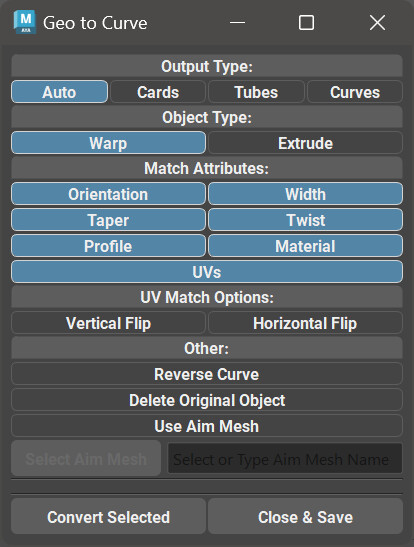
- New Card to Curve algorithm - convert any one sided card to procedural card with curve control and all the features of GS CurveTools. It will (attempt) to transfer attributes such as orientation, twist, profile and even UVs to a new procedural card. Any number of selected geometry cards can be converted in one go.

- Copy, Paste and Filter attributes - a new feature of transfer attributes and UVs buttons. Copy and Paste are pretty self explanatory. Filter will allow you to choose which attributes are transferred using Transfer and Copy-Paste functions.

- Maya 2024 support!

... and even more features and improvements!

Full changelog here: LINK


Report

Very scary taboo topic for ArtStation. Don't read.

News / 16 January 2023

So I just noticed that my blog post about russian war in Ukraine (my home) and my take on this topic was silently deleted.

I don't know when it happened but there were no warnings, no messages, no explanation.

I don't care if it's some russian staff member/moderator who was offended, russian bot attack, ArtStations' policy about this topic or whatever. They do have the right to moderate their platform. Just annoyed that it was done in a sneaky, silent and backstabby way like that. But Ukrainians are used to backstabs at this point.

I will not repeat myself here.

If someone wants to read a small part of that post, you can find it on my Discord. There's nothing brutal there or in my deleted post for that matter.

Anyway, work on the plug-ins continues. Hopefully there will be a new major free update for CurveTools and then for Toolbox soon, if constant power outages and air raid alerts allow it. Stay safe and make art.

Слава Україні!

P.S. The post was created just to notify the ArtStation community about a deleted post. Some people apparently had a wrong impression that it was meant for ArtStation staff or something.

Report

[-50% SALE] Black Friday / Cyber Days sale on GS CurveTools and GS Toolbox plug-ins for Maya

News / 24 November 2022

Black Friday (Cyber Days) sale is here! 

-50% on everything!

(November 24 - December 03)

STORE LINK


GS CurveTools

GS CurveTools for Maya simplifies the process of creating beautiful hairstyles for games by allowing for quick and easy control over hair cards using curves.

GS Toolbox

GS Toolbox is a powerful polygon modeling tool for Maya, that simplifies the most used functions in Maya as well as adding a bunch of unique functionality like Fill with Quads, Instance+, Interactive Booleans, Procedural Arrays and more.

Report

GS CurveTools Trailer/Quick Overview

Tutorial / 29 August 2022

GS CurveTools Trailer/Quick Overview

Just a quick overview video for new users of GS CurveTools:


Report

GS CurveTools v1.2.8 Update - Optimization and Bugfixes

News / 27 June 2022

GS CurveTools v1.2.8 Update - Optimization and Bugfixes

Update Video:


New Features:

  • All the relevant buttons now have (optional) tooltips. Can be disabled in the Options.

Improvements:

  • Convert Curves is now out of beta (in the Options menu):
    • Card -> Card conversion will now correctly keep original orientation and profile.
    • Will now retain original materials on conversion.
    • Performance was improved.
    • Twist, Width and Profile Graphs are now applied to ALL selected curves.
  • Card to Curve algorithm was rewritten and improved:
    • Better compatibility and reliability for one-sided cards with different vert orders.
    • Optimization and speed-up of the algorithm
    • Cards with no width spans are now correctly converted.
  • Massive improvement of the Mirror operation:
    • Improved orientation and profile calculation during mirror for all Warp and Extrude cards.
    • Speed-up and optimization.
    • Much less orientation “drift” when using “Flip”.
  • Orient to Normals algorithm improvements:
    • Optimization and speed-up.
    • Increased precision with less iterations.
    • Cards will not flip or change orientation on continuous use on already aligned cards.
    • Reduced angle tolerance to 1 degree by default.
  • Select CVs slider was improved. Current hotkeys:
    • Shift + Drag: additive selection.
    • Alt + Drag: deselect CVs.
    • Ctrl + Drag: allows for slider movement without selection change.
  • Expanded supported texture formats list for the UV editor. Added TIFF (TIF).
    • Full list of supported texture formats: JPG, JPEG, PNG, TIF, TIFF, TGA (24bit, no RLE).
    • Also added additional info for the “Wrong format” error message. It will now specify that TGA has no support for RLE compression.
  • Minor improvements for curve creation algorithm (better refinement and divisions calculation)
  • Some minor UI adjustments

Bug Fixes:

  • Fixed a hotkey conflict with layer selection:
    • Holding Ctrl + clicking on Layer should now select the contents of that layer, and deselect everything else like intended.
    • Show Always on Top hotkey changed to Ctrl+Alt.
  • Fixed a bug where “Layer Isolation Selection” hotkey was not working properly. Now holding Shift+Alt and clicking on Layer will isolate select this layer properly.
  • Transfer UVs will now correctly transfer H-Flip UV attribute.
  • Select CVs slider will no longer deselect the last selected CV when using subtractive mode.
Report

GS Toolbox and GS CurveTools Maya 2023 Updates

News / 27 April 2022

Both GS Toolbox and GS CurveTools were updated to support Maya 2023.

GS CurveTools v1.2.7 Update

New Features:

  • Maya 2023 Support
  • Global and Per-Layer Always-On-Top toggle for curves (“Per-Layer” is only for Maya 2022+)
  • (BETA) Convert one type of Card/Tube to the other type (Warp->Extrude, and vice versa).
  • Might have issues with orientation when converting
  • Might have other issues with old Cards/Tubes
  • Recommended to use only on newly created cards/tubes (v1.2.7+) and NOT on the old ones.

Improvements:

  • Scale Factor is now stored in the scene as well as in every created curve. This will allow for better compatibility with other functions and more reliable workflows in the future.

Bug Fixes:

  • UV Bug that was in 2020 and 2022 was fixed in 2023 by Autodesk. 2020 and 2022 still have it, obviously.

Deprecation:

  • Maya 2017 support is dropped. Might work just fine with this update, but there will be no bug fixes for 2017.

GS CurveTools v1.2.7 Update Video:


GS Toolbox v1.1.6 Update

New Features:

  • Maya 2023 Support
  • Selection Sets Boolean Logic. Middle Mouse Drag or Click with Modifiers:
  • Shift + Ctrl to add selection to the layer or (combine layers if dragged)
  • Shift + Alt to get a difference between the layer and the selection (or the difference between dragged and target layer)
  • Ctrl + Alt to get an intersection between the selection and the layer (or the intersection between the dragged and target layer)

Improvements:

  • Major improvement for Duplicate and Extract functions. They will now separate only selected faces and other detached shells will stay combined with the original object.
  • Added Hotkeys:
    • Create Crease Sets
    • Creases to Bevels
    • Bake Crease Sets

Bug Fixes:

  • Fixed a bug with “Repeat Last” hotkey not working for some functions.

Deprecation:

  • Maya 2017 Support is Dropped. It might still work just fine but there will be no bug fixes for this version.

GS Toolbox v1.1.6 Update Video:


Report

GS CurveTools and Maya 2018 deformer issue

News / 24 April 2022

As this issue keeps resurfacing for some users I'm reminding you about the documentation and that it has many useful insights on those issues.

It is highly recommended to use the latest patches available for your supported version of Maya, unless it's the latest release (like 2023).

Maya 2018 patches prior to 2018.6 had issues with the deformers that affected GS CurveTools functionality.

If you ever encountered the issue where during the orientation some vertices were "stuck" in place, this is it.

Just update to 2018.6 and you are good to go.


Report

GS CurveTools and Toolbox and Maya 2023

News / 01 April 2022

About Maya 2023

I know everyone is excited to update and try new features and promised performance improvements. 

However, when you are using external plug-ins it's always a good idea to wait a bit, before updating. 

Maya 2023 is not yet officially supported for GS Toolbox and GS CurveTools. Any issues you might have with the new version (if the plug-ins will work at all) will not be considered as bugs or noted until I go through and test everything myself. 

Right now I have no time to update the plug-ins to 2023, however, it will be done and 2023 will be supported as soon as possible. 

Maya 2017 support will be dropped, as there is no way I will be able to add new features and test so many versions of Maya for bugs. It might still work just fine, as 2017 and 2018 are very similar. However, I will not actively bugfix 2017 issues after 2023 version is supported.

Report

GS CurveTools v1.2.5 Update - UV Editor & Layer Management Improvements

News / 24 January 2022

GS CurveTools v1.2.5 Update

UV Editor Non-Square Texture Maps Support

This update for GS CurveTools is focused on improving the UV Editor and Layer Management System.

IMPORTANT: when updating you must reinitialize the plug-in using the initialization command from the installation steps.

UV Editor Non-Square Textures Support

UV Editor was introduced in v1.2 in order to get rid of the tedious UV setup process. However, before v1.2.5 UV Editor was not compatible with non-square texture maps, and was displaying them incorrectly. There were workarounds, but in general that was a serious limitation to its functionality.

With v1.2.5 that was completely fixed and now any texture resolution combinations are supported. 2048x4096 or 4096x1024 or any other resolution will be correctly displayed.

UV Editor Alpha Map Support

Alpha map and Transparency is now supported as well. You can enable the transparency in the new Options tab by clicking on the Alpha toggle.

Alpha map must be connected to the Transparency plug in the material.

UV Editor Custom Viewport Colors

UV Editor can now be customized using Editor Colors color swatches. They control background(1), grid(2) and frame colors(3):

Those colors will be saved automatically and used in every project. To reset the colors, reset the plug-in settings to the default.

UV Editor Texture Map Transforms

Texture map preview in the UV Editor will now use Translate Frame and Coverage parameters from the place2dTexture node. Texture map will be transformed based on those parameters if Transform toggle is enabled.

Layer Customization Improvements

With v1.2.5 there is a new field in the Layer Customization Window (previously Custom Colors Window) that allows the user to name each layer individually and store those names as a global preset.

Whenever Regroup by Layer button is pressed, those names will be used as new names for the generated groups.

IMPORTANT: Don't forget to press "Set To Scene" to apply the changes to the scene or "Save to Preset" to save global preset.

More info is in the documentation: LINK

Update Video:


Report