Maya 2025 Support for GS CurveTools and GS Toolbox plug-ins!

News / 02 May 2024

Maya 2025 Support for GS CurveTools and GS Toolbox plug-ins!

GS CurveTools and GS Toolbox are now updated to support Maya 2025!

GS CurveTools v1.3.6:

NEW FEATURES:

  • Full Maya 2025 support (please report bugs)

BUG FIXES:

  • Minor bug fixes and code refactoring

GS Toolbox v1.1.8:

NEW FEATURES:

  • Maya 2025 Support (please report bugs).

IMPROVEMENTS:

  • Old versions are now available as a download (v1.1+).
  • Snap to Poly algorithm was improved. 
    • Snapping multiple selected objects to multiple faces will now work as expected.
    • If the number of selected faces is bigger than the number of selected objects it will now snap everything in a repeating pattern, so all the faces are populated.
  • General code improvement for maintainability.
  • Hotkeys system was changed internally for better maintainability. You might need to check your hotkeys for GS Toolbox.

BUG FIXES:

  • Fixed a rare bug with custom materials that prevented them from being created.
  • Fixed a Snap to Poly bug that prevented it to be functional if only one poly is selected.
  • Extract Snapshot bug was fixed.
  • Several small bug fixes with regex and other boring stuff.

HOW TO UPDATE (IMPORTANT):

  1. Close Maya and delete the old gs_toolbox folder (backup the custom materials (presets) folder if needed)
  2. Download and paste the new gs_toolbox folder to "Documents / maya / {your maya version} / scripts"
  3. Paste the custom materials (presets) back (if you had them before).
  4. Open Maya and run the init command found in the readme.txt
Report

Maya 2025 Update News (GS CurveTools and GS Toolbox)

News / 17 April 2024

Maya 2025 was released not long ago.

Great news for all the users who've been asking: GS CurveTools and GS Toolbox will indeed be updated to support Maya 2025!

I already have a working version of the plug-ins for my internal testing and there's no breaking incompatibilities found so far.

If you are interested in more technical details of why this update is a bit special:

Autodesk switched from using python UI library called PySide2 to a newer version of it, called PySide6. This new version, although generally compatible, has a bunch of modules and classes shuffled around so it all needs to be confirmed working before the plug-ins can be released to the public. Also, the version of Python used was also changed but that's not a problem for the tools.

As to when it will be updated - stay tuned and wait for the notification. It should be a fairly quick update.

Report

GS CurveTools v1.3.5 Update

News / 05 March 2024

GS CurveTools v1.3.5 Update

Just a small update to add some fixes and improvements.

GS CurveTools v1.3.5:

IMPROVEMENTS:

  • Automatically reveal the layer if it is hidden and the new object is being created into it.
  • Old versions (v1.2 and up) are now available as a download for Personal Licenses.

BUG FIXES:

  • Unpack will no longer be affected by the selected object type in Geo to Curve window.
  • Export will no longer be locked by the Advanced Visibility node present in the scene.
Report

GS CurveTools v1.3.4 Update

News / 11 December 2023

GS CurveTools v1.3.4 Update

A minor update for GS CurveTools to fix some bugs and add some missing tooltips.

Improvements:

  • Added tooltips to Scale Factor and Precision window and all the controls.
  • Normalize to Default will now reset the sliders even if no curves were selected in the viewport.

Bug Fixes:

  • Fixed Layer color picker in the Curve Control Window. It will now change layer color properly.
  • No more errors when trying to Extract All in an empty scene with no curves.
  • Fixed tooltips for all the color pickers in the UI (UV Editor and Curve Control Window).
Report

GS CurveTools v1.3.3 Update!

News / 28 November 2023

GS CurveTools v1.3.3 Update!

This update brings better precision for the Warp objects (Cards, Tubes and Bind objects) when working on very small scales. 

Before, when working on something tiny like individual brow hairs or eyelashes, there was noticeable distortion in the mesh because of the lack of precision. 

This was fixed in this update by introduction of Precision Scale parameter that will be automatically applied to every new Warp object.

The new Precision Scale parameter can be found in the Options -> Scale Factor and Precision window.

Old Warp objects can also be Normalized using Normalize Selected to Default or Normalize Selected buttons. They will reset the values to default ones and apply them to the selected Warp objects or set them based on the slider values respectively.

Normalization will not change the appearance of the card other than fixing the deformation caused by insufficient Precision Scale values set before.

Warp objects will also be automatically normalized when using functions like Fill, Add Card, Add Tube or Attribute Transfer. Normalization is done to ensure the correct Widths and Profiles of the newly created cards or correct attribute transfer.

Other notable changes:

  • Rebuild slider will now work properly on small scale curves.
  • New objects should now be able to create more sharp corners when three or more CVs are bunched together.
  • Smooth slider was removed from the “Other” tab in the Curve Control Window (don’t confuse with the Smooth function from the main window, it’s still there). It was removed because it interfered with the new precision options. There is an option in the Options⇨Other menu to reset the smooth value to 0 if needed for older projects.
  • Mirror will now work properly on Tube objects
  • Opening Log file will no longer block Maya until the log is closed.

Update Video:


Update Changelog and documentation: LINK

Report

GS CurveTools v1.3.2 Update

News / 27 October 2023

GS CurveTools v1.3.2 Update

GS CurveTools was just updated to v1.3.2! There is one new feature and a bunch of improvements to other functions.

IMPORTANT NOTE: This update has a lot of internal code changes so it is critical to completely re-install GS CurveTools. Installation and Update Instructions. Everything is backwards-compatible but just in case it is recommended to finish the old projects before updating.

UNPACK

A new Unpack feature was introduced. This function is an alternative mode for the Unbind function, and can be accessed by holding Shift and clicking on Unbind button in the menu. A separate hotkey is also available.

Unpack is a logical extension of the Unbind. When any Bound object is selected and the function is used, it will generate new cards or tubes in-place based on the Bound object geometry. So if you have 3 cards bound to one curve using "Bind" after the Unpack you will get 3 separate cards (with all the controls) in the same spot where the original Bound cards were. All the deformations and world position is maintained. UVs and other attributes are adjusted accordingly.

As this function essentially generates new cards and tubes and adjusts them to match the Bound geometry, it is not possible to get a 100% match between the Bound object and Unpacked cards/tubes. However, in most cases it gives a very close to the original approximation.

Unpack will only generate and match geometry that is one sided card and/or hollow tubes. All the other geometry will be ignored. So if you have some unusual shape Bound to a curve using Bind it will be ignored.

GEO TO CURVE

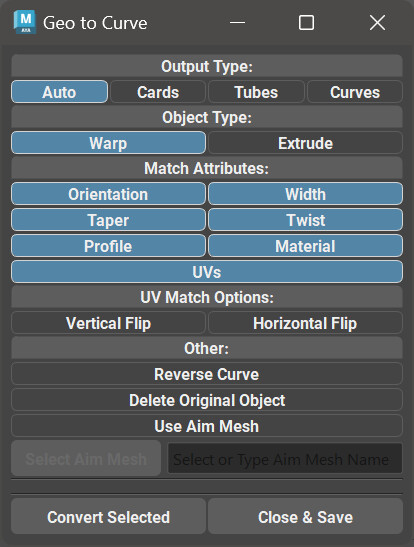
Geo to Curve is an upgrade to the previous function - Card to Curve. Card to Curve button was renamed to Geo to Curve.

Geo to Curve convert any compatible geometry to procedural cards or tubes based on the options selected in the Geo to Curve menu.

In this update the output object can also be a tube, not only a card.

Some of the new features are:

Output Type:

  • Auto mode will determine the original geometry shape automatically (card or tube) and generate the new procedural objects accordingly.
  • Cards or Tubes mode will generate procedural Cards or Tubes from the selected geometry. Cards can be generated from tubes and vice versa, however, some of the attributes will not be matched when the original shape is different from the selected output type.
  • Curves will simply output a NURBS curve based on the selected geometry.

Delete Original Objects - will delete the original geo after the conversion process.

Use Aim Mesh - will allow user to select a mesh from the scene and this mesh will be used to calculate the correct placement of the root node of the curve. For example, it is recommended for the root node of the NURBS curve (the square symbol) to be closer to the scalp mesh. This function ensures it is so by calculating distance to the surface of the mesh from tip and root, and flipping the curve if needed.

Additionally, there were numerous improvements to the UV matching algorithm in Geo to Curve and it now matches the original UVs much better (including the flipped UVs).

NEW AUTO-SAMPLING MODE

New Auto-Sampling toggle attribute that will automatically increase sampling rate for Warp based objects on low CV counts. This allows for optimal performance on high CV counts and good accuracy on low CV counts. This mode is enabled by default and should stay on, unless you need to change it manually for some reason. Same goes for Auto-Refine mode.

FILL IMPROVEMENTS

Fill can now output regular NURBS curves. This mode is toggled in the Options menu.

MAYA 2024 STANDARD SURFACE:

Standard Surface material from Maya 2024+ is now fully supported by the UV editor.

BUG FIXES:

  • Fixed a bug with Curve Tubes (warp) not scaling properly with high WidthX or WidthZ values.
  • Fixed a bug with Auto-Hide Curves on Inactive Collections checkbox. It will now work properly with Layer filters.
  • GS CurveTools will now automatically load built-in Maya plug-ins that it needs. If user disabled those plug-ins in the past it should not cause errors now. For now it’s “curveWarp” and “lookdevKit” plug-ins that are required.

UPDATE VIDEO:


Report

GS CurveTools v1.3.1 Update and Bugfix

News / 19 May 2023

GS CurveTools v1.3.1 Update

A small update to fix a critical bug with Attribute and UV filters.

Improvements:

  • Changed node id in plug-ins for a proper one from Autodesk. Should avoid conflicts with other plug-ins in the future.
  • Better error handling and error message for corrupted layer names (copy-pasted curves or improperly imported curves).

Bug Fixes:

  • Fixed a critical bug with Attribute and UV transfer filters (and Copy-Paste). They will now work properly when deselecting some attributes in filter window and transferring attributes to different type of card/tube.


Also, please read this in case you had issues with Maya's Copy-Paste functionality corrupting GS CurveTools layers (Ctrl+C, Ctrl+V in viewport):

https://gs-curvetools.readthedocs.io/en/latest/faq.html#corrupted-layer-names

This issue can also happen if you import from some other scene that had GS CurveTools objects (cards/tubes) in it. 
Use GS CurveTools -> Options -> Export/Import function to export and import curves to avoid issues.

Report

GS CurveTools v1.3 Major Update - Advanced Visibility

News / 04 April 2023

GS CurveTools is now even better with v1.3 update! 

The main focus of this update is scene organization and workflow improvements. You can find the plug-in here: LINK


Some of the most notable new features:

See the visualization of these features here: LINK

- Advanced Visibility - this is a new feature that allows user to toggle geometry or curve highlight of the selected curves. This highlight can be customized by changing color and size of the components (CVs, curve, hull) as well as some additional customization options.

- Fully Reworked Color Mode - colorize mode from the previous versions was reworked to now support alpha map transparency and it will also work with most of the functions of GS CurveTools. User can work in this mode from start to finish and then just switch back to the original texture, or turn it on and off when needed during the modeling process.

- New Layer Collections System - organize complex projects into separate named collections, use some useful functions like auto-hide curves on inactive collections, template collection ignore and import curves into a new collection.

- Dynamic Subdivisions (Dynamic Length Divisions) - changes the divisions of the geometry based on the length of the curve and divisions density slider. Fully procedural. Set and forget.

- New Card to Curve algorithm - convert any one sided card to procedural card with curve control and all the features of GS CurveTools. It will (attempt) to transfer attributes such as orientation, twist, profile and even UVs to a new procedural card. Any number of selected geometry cards can be converted in one go.

- Copy, Paste and Filter attributes - a new feature of transfer attributes and UVs buttons. Copy and Paste are pretty self explanatory. Filter will allow you to choose which attributes are transferred using Transfer and Copy-Paste functions.

- Maya 2024 support!

... and even more features and improvements!

Full changelog here: LINK


Report

Very scary taboo topic for ArtStation. Don't read.

News / 16 January 2023

So I just noticed that my blog post about russian war in Ukraine (my home) and my take on this topic was silently deleted.

I don't know when it happened but there were no warnings, no messages, no explanation.

I don't care if it's some russian staff member/moderator who was offended, russian bot attack, ArtStations' policy about this topic or whatever. They do have the right to moderate their platform. Just annoyed that it was done in a sneaky, silent and backstabby way like that. But Ukrainians are used to backstabs at this point.

I will not repeat myself here.

If someone wants to read a small part of that post, you can find it on my Discord. There's nothing brutal there or in my deleted post for that matter.

Anyway, work on the plug-ins continues. Hopefully there will be a new major free update for CurveTools and then for Toolbox soon, if constant power outages and air raid alerts allow it. Stay safe and make art.

Слава Україні!

P.S. The post was created just to notify the ArtStation community about a deleted post. Some people apparently had a wrong impression that it was meant for ArtStation staff or something.

Report

[-50% SALE] Black Friday / Cyber Days sale on GS CurveTools and GS Toolbox plug-ins for Maya

News / 24 November 2022

Black Friday (Cyber Days) sale is here! 

-50% on everything!

(November 24 - December 03)

STORE LINK


GS CurveTools

GS CurveTools for Maya simplifies the process of creating beautiful hairstyles for games by allowing for quick and easy control over hair cards using curves.

GS Toolbox

GS Toolbox is a powerful polygon modeling tool for Maya, that simplifies the most used functions in Maya as well as adding a bunch of unique functionality like Fill with Quads, Instance+, Interactive Booleans, Procedural Arrays and more.

Report